 Local Hair Color
Copper, auburn, or cherry cola? Try each one on your photo first
Copper, auburn, and cherry cola all get called “red,” but they can look like three different people on the same head. If you’re drawn to a warmer color and can’t decide which one, the easiest way to find out is to put all three on your own photo and look at them side by side.
The short versionFor a copper hair try on, pick a clear photo of yourself, then compare Copper, Auburn, and Cherry Cola one after another. Copper reads brighter and more orange-gold, auburn deeper and browner, and cherry cola darker with a red-violet cast. Try each at two intensities, check a daylight photo too, and tap Natural to compare.
Copper vs auburn vs cherry cola: how they read
These names get used loosely, and every salon and box can mean something a little different by them. Here’s roughly how the four warm shades in Local Hair Color’s Trending row compare, so you know what you’re looking at when you tap through them.
Copper
The brightest of the group. Orange and gold lead, so it tends to look sunny and noticeable, especially where light hits your hair.
Auburn
Deeper and browner. The red is there, but it sits inside a brown base, so it often reads as warm and grounded rather than bright.
Cherry Cola
Dark brown with a red-violet cast. In shadow it can look almost brunette, then show its berry tone where the light catches.
Burgundy
A cousin of cherry cola that leans further into wine and purple. Worth a look if cherry cola feels close but not quite rich enough.
None of these is better than the others. They just answer different questions: do you want your hair to glow, to feel warm but quiet, or to look dark and rich with a hint of red? Seeing them on your own face and hair makes that choice much clearer than a swatch card ever can.
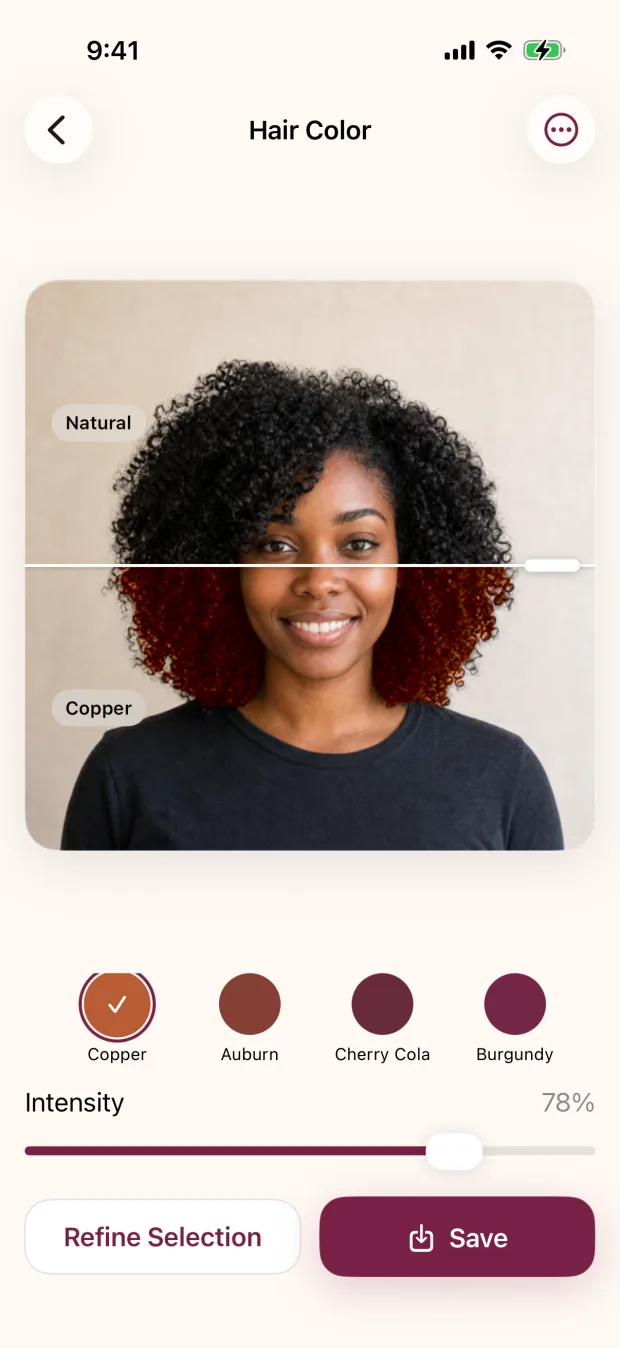
Start with one clear photo
Choose a photo where your hair is sharp and well lit, ideally from the shoulders up. Warm shades are easy to misjudge when the photo is blurry or heavily filtered, so skip beauty filters for this. Our guide on choosing a photo for a hair color preview has more on what makes a photo easy to judge.
Local Hair Color finds your hair on your iPhone or iPad and reuses that selection as you switch shades, so tapping from Copper to Auburn to Cherry Cola is quick.
Tap through all three, then add Burgundy
Look at each shade for a few seconds before moving on. Notice where your eye goes first. With copper it’s often the brightness of the ends and any spot where light hits. With auburn it may be the overall warmth. With cherry cola, look at how dark it reads overall and whether you like the violet edge in the highlights.
If cherry cola is close but you want more wine, try Burgundy. If copper feels too bright and auburn too brown, that’s useful information too. It tells your colorist you’re somewhere between them.
Try each at a couple of intensities
The intensity slider changes how much of the new shade covers your own color. Lower intensity lets more of your natural color show through, which feels closer to a subtle, blended warmth. Higher intensity makes the shade bold and obvious.
A good habit is to look at every shade twice: once around the middle of the slider and once near full. A soft copper and a full copper can feel like two different decisions, and you might find you love one and not the other.

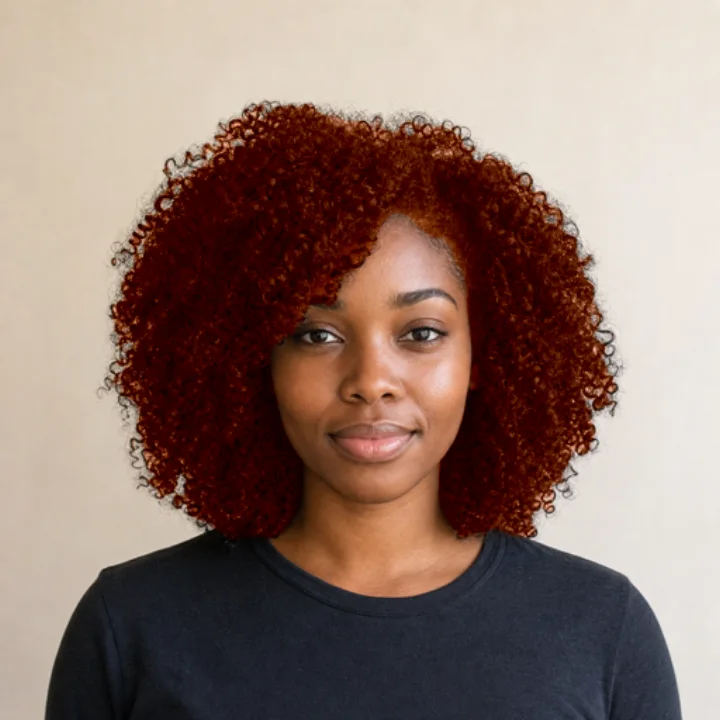
Check a daylight photo too
Warm indoor lighting adds its own orange glow, which can make copper look brighter and auburn look redder than they would outside. Cooler light can do the opposite and make warm shades look more muted.
So once you’ve narrowed it down, run your favorite shades on a second photo taken near a window or outdoors in daylight. If a shade still looks good in both, that’s a strong sign you like the direction, not just the lighting.
Compare with your original and tidy the edges
Tap Natural in the shade row to see your original photo, then tap your shade again. Bright warm colors make any missed strands or spill onto skin easier to spot, so zoom in around your hairline and shoulders. On a photo, Refine Selection lets you add missed hair or remove color from where it shouldn’t be, and Reset to Automatic puts everything back.
Save your top two or three
Save a copy of each favorite. The app writes a new image and never changes your original. Having copper, auburn, and cherry cola saved from the same photo makes it very easy to show someone exactly which direction you mean.
Name the feeling, not only the shade.
“Bright and sunny,” “warm but low-key,” or “dark with a red glow” can help a colorist as much as the word copper or auburn, since those names vary from place to place.
What to ask a colorist about reds
A preview helps you choose a direction. A colorist helps you figure out how to get there on your actual hair. Bring your saved previews and a photo of your hair in daylight, and ask a few practical questions:
- Is this shade achievable from my current color, and how many visits might it take?
- How does this kind of color tend to fade on hair like mine, and what might it look like between appointments?
- How often would I likely need a refresh or gloss to keep it looking like the preview?
- Are there washing or product habits that help it last?
- If I want to go back to my natural color later, what would that involve?
Fading and upkeep are especially worth asking about with warm shades, because they affect how much time and money the color will take after the first appointment. For a fuller list, see what to show your colorist. If you’re coloring at home, follow the product instructions and do any strand test and allergy test they call for, and read why box dye can look different from the box before you start.
What the preview can and can’t tell you
The preview shows a color direction on your photo, applied to all of the selected hair. It doesn’t predict what dye will do, and it doesn’t place highlights or dimension. Your real result depends on your starting color, past color and treatments, the condition of your hair, products, and technique. Use it to decide what you like, then let a strand test or a colorist tell you what’s possible.
Your warm-shade checklist
- Pick one sharp, well lit photo without filters
- Tap through Copper, Auburn, and Cherry Cola
- Add Burgundy if you want a deeper wine tone
- Look at each shade at medium and full intensity
- Repeat your favorites on a daylight photo
- Tap Natural to compare, and tidy any edges
- Save your top two or three
- Ask about fading, upkeep, and number of visits
Quick questions
What is the difference between copper and auburn hair?
Copper is usually brighter, with more orange and gold. Auburn is deeper, with red sitting inside a brown base. Seeing both on your own photo is the quickest way to feel the difference.
Is cherry cola hair red or brown?
A bit of both. It’s generally a dark brown with a red-violet cast, so it can look brunette in shadow and show its berry tone in the light.
Can I try copper hair on my own photo?
Yes. Local Hair Color previews Copper, Auburn, Cherry Cola, and Burgundy on your own photo on iPhone or iPad, with an intensity slider and a quick compare to your original. See all the features.
Why does copper look different indoors?
Warm indoor light adds orange to everything, which can exaggerate copper and red tones. Checking a daylight photo gives you a second opinion.