 Local Hair Color
What would I look like with gray hair? See it on your own photo first
Deciding to stop coloring and let your gray come through is a big, personal choice. For some people it feels like freedom; for others it brings up a lot of feelings at once. Both are completely normal. One gentle way to think it over is to see a version of yourself with silver or white hair before you commit to months of growing it out.
The short versionTo see what you would look like with gray hair, try Silver and Platinum on a clear photo of yourself, then use Custom for softer pewter or near-white tones. Test each at a few intensities and tap Natural to compare with your current color. It shows a general direction, not your real gray pattern.
Why preview going gray before you stop dyeing
Growing out color takes time. Hair grows gradually, so the in-between stage, with a visible line between your colored lengths and your natural roots, can last a good while. It helps to feel sure about where you’re heading before you start that stretch.
A preview also gives you something you can’t easily get from other people’s photos: you, with your face, your usual clothes, your glasses, and your makeup or lack of it, next to a silver tone. Some people are surprised by how much they like it. Others realize they want to keep coloring for now, and that’s a perfectly good answer too. There’s no right age and no right choice here, only what feels like you.
Start with a photo you like of yourself
Pick a recent, clear photo in soft, even light, ideally one where you feel like yourself. Daylight from a window is kind to both skin and hair. Avoid strong filters, which can shift the colors around your face and make a silver tone look muddy or too blue. Our guide to choosing a photo for a better hair color preview has more tips.
If your photo already shows some gray at the roots, that’s fine. Look closely after the app finds your hair, and use Refine Selection to add any strands it missed or remove color that spilled onto your skin or clothes.
Try Silver, then Platinum
Local Hair Color includes two curated shades that are a natural place to begin:
Silver
A cool gray tone. The closest starting point for a classic salt-and-silver look.
Platinum
A very pale, light tone. Useful for imagining a bright, white-leaning finish.
Look at each one for a moment before deciding. First impressions of any big change are often “that’s not me,” simply because it’s unfamiliar. Come back to it after a minute and see how it feels.
Use Custom for softer grays and near-white tones
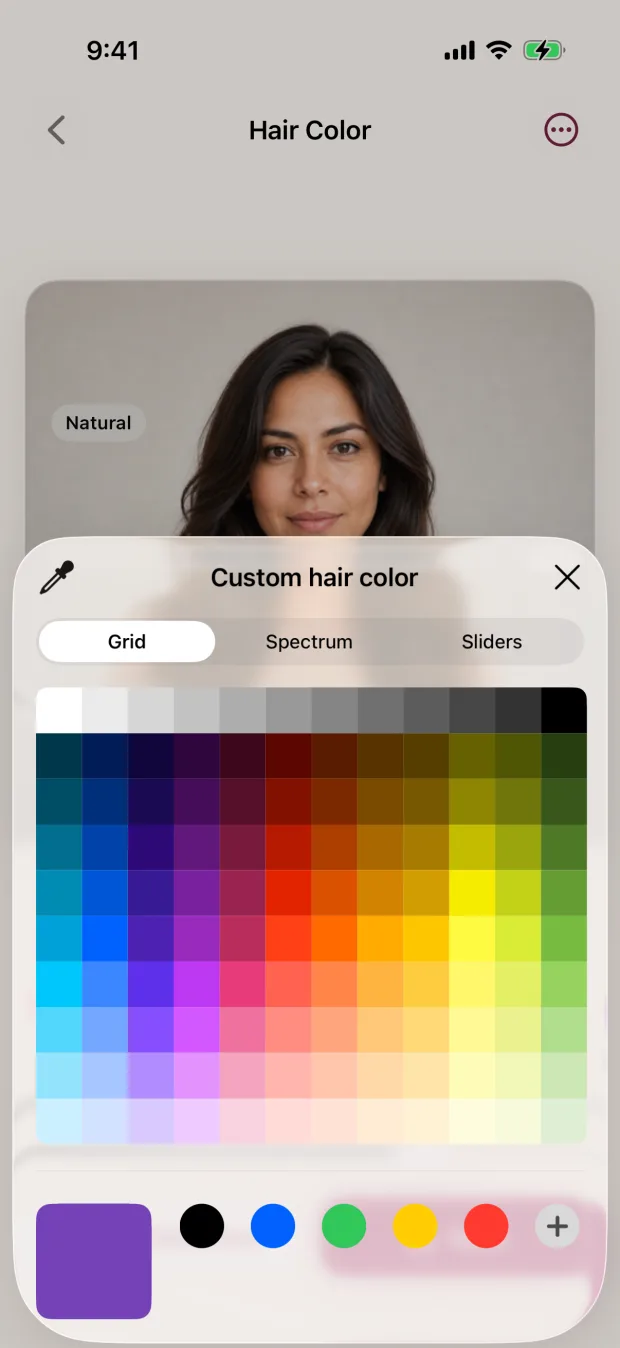
Natural gray comes in many shades, from dark pewter to snowy white, and it can lean warm, cool, or neutral. If Silver feels too cool or Platinum too pale, choose Custom and pick a color yourself with Apple’s grid, spectrum, or sliders.
Try a slightly deeper gray for a pewter feel, or a soft off-white for a brighter look. Small moves make a real difference, so change one thing at a time and compare.
Change the intensity
The intensity slider changes how strongly the new tone covers your hair. At lower intensity, more of your current color shows through, which can give a softer, more muted impression. At higher intensity, the gray or white reads clearly.
Try each tone at two or three intensities. You may find you love a fully silver look, or that a gentler version feels more like you.
Compare with your current color
Tap Natural in the shade row to see your original photo, then tap your gray tone again. Because nothing else in the photo changes, you can focus on how the color sits next to your skin, eyes, and brows. Notice whether you’d want to change anything else, like your glasses frames or lipstick, if you went gray. Those are fun questions to play with too.
Save the previews you like. The app saves a new copy and never changes your original photo. You might want to live with them for a week or two, or share them with someone you trust.
What the preview can’t show you
Real gray hair rarely arrives as one even color. It usually comes in with its own pattern and placement, often more at the temples or the part, mixed with your natural color. Some people also notice a change in texture as gray grows in. The preview can’t know any of that. The app colors all the selected hair in one tone at the strength you choose. It doesn’t add blending, highlights, lowlights, or salt-and-pepper placement. So think of your preview as an answer to “Do I like a silver or white direction on me?” rather than a picture of exactly how your gray will look.
Talk to a colorist about how to get there
If you decide you’d like to go gray, there are different ways to handle the transition. Some people simply grow it out. Others ask a colorist about ways to soften the line between colored and natural hair while it grows. Which approach suits you depends on your current color, your hair history, and how visible you’re comfortable with the in-between stage being.
A colorist can look at your actual regrowth, tell you what options are realistic, and help you plan. Bringing your previews along makes it easy to show the finish you’re imagining. Our guide on what to show your colorist includes a checklist of hair history worth mentioning.
You can change your mind.
Previewing gray doesn’t commit you to anything. Try it today, look again next month, or keep a favorite preview for the day you feel ready.
Private by design
Choosing your photo, finding your hair, previewing colors, corrections, and saving all happen on your iPhone or iPad. There’s no account and your photo isn’t sent to a server. Purchases and restores go through Apple and may need a connection. You can see a shade on your own photo during setup before choosing access; the pricing page explains the options.
Your gray preview checklist
- Pick a recent photo in soft, even light
- Check the edges and refine any missed strands
- Try Silver, then Platinum
- Use Custom for pewter or soft white
- Test a few intensities
- Tap Natural to compare with your current color
- Save favorites and talk to a colorist about the transition
Quick questions
How can I see what I would look like with gray hair?
Try a silver or white tone on a clear photo of yourself. In Local Hair Color, start with Silver and Platinum, then use Custom for softer grays, and compare with your original by tapping Natural.
Will the preview show my real gray pattern?
No. It colors all the selected hair in one tone. Your real gray may come in unevenly, mixed with your natural color, and sometimes with a different texture.
Can the app add salt-and-pepper or blended gray?
Not currently. It doesn’t place highlights, lowlights, or blended strands. Lowering the intensity lets more of your current color show through, which gives a softer overall impression, but it isn’t the same as real blending.
How do I transition to gray hair?
Some people grow it out, and others ask a colorist about softening the line as it grows. A colorist who can see your hair is the best person to suggest what’s realistic for you.