 Local Hair Color
Try pink, blue, or purple hair on your own photo first
Maybe you’ve been saving pictures of pastel pink hair for months. Maybe a friend dared you to go blue. Either way, a bold color is a big change, and it’s a lot more fun to decide once you’ve actually seen yourself with it. Here’s how to try bright colors on your own photo, and what to know before you make it real.
The short versionTo try pink hair on your photo, choose a clear picture of yourself, pick Pink, Blue, Purple, or Green, and move the intensity slider: lower for a softer, pastel-leaning look, higher for vivid color. Try Rose Gold for something gentler, or Custom for a specific shade. Tap Natural to compare, then save a copy.
The bold shades, and a softer route
Local Hair Color has a Bold row with four bright colors, plus Rose Gold in the Trending row for when you want color that’s playful but easier to live with. Here’s a quick feel for each.
Pink
The classic. At lower intensity it can feel soft and candy-like; at full intensity it’s bright and unmistakable.
Blue
Cool and striking. The intensity slider changes its mood a lot, so it’s worth trying at more than one setting.
Purple
Sits between the warmth of pink and the coolness of blue. A popular choice if you want bold but a little moodier.
Green
The wildcard. Great for a costume, a festival, or simply finding out whether you’re a green-hair person.
Rose Gold
A warmer, softer pink with a golden edge. A good first step if full pink feels like a lot.
Pick a photo where your hair is easy to see
Bright colors show every edge, so a clear, well lit photo helps a lot. Choose one where your hair stands out from the background and isn’t hidden under a hat. A selfie by a window is perfect. Our guide on choosing a photo for a hair color preview goes into more detail.
The app finds your hair on your iPhone or iPad. Your photo isn’t uploaded anywhere, which is nice when you’re just playing around.
Try every bold shade, even the ones you’d never pick
Tap through Pink, Blue, Purple, and Green. It only takes a moment, and sometimes the one you’d have ruled out turns out to be your favorite. Pay attention to how each color sits next to your skin and eyes in the photo, and how it makes you feel when you look at it.
Use intensity for pastel or vivid
The intensity slider is where a lot of the fun happens. Lower intensity lets more of your own hair color show through, which can give a softer, washed, more pastel-leaning look. Full intensity gives you the vivid, fresh-from-the-salon version.
Try each favorite both ways. You might discover that you love a whisper of lavender but not a full purple, or the opposite.
Use Custom for the shade you saw
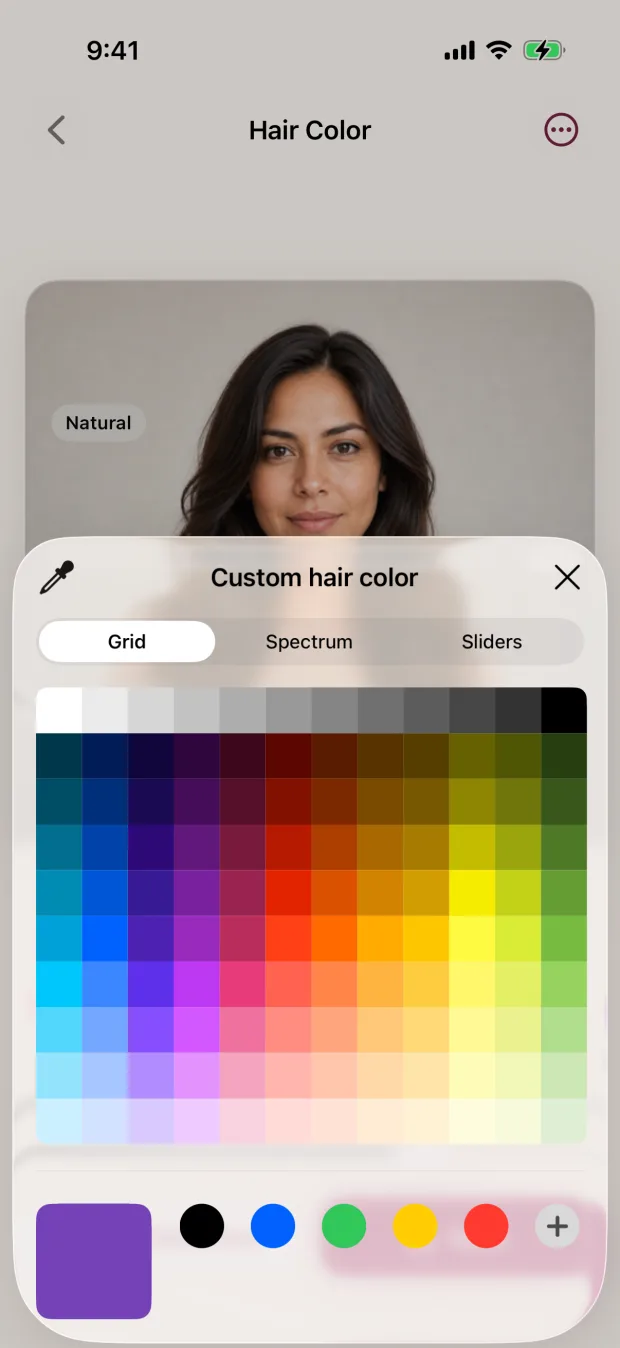
Saw a teal or a magenta somewhere and can’t stop thinking about it? Choose Custom and use Apple’s color picker (the grid, spectrum, or sliders) to get close to it. Then adjust the intensity the same way you would for any other shade.
Custom is also handy for fine tuning. If Pink is a touch too cool for you, nudge it warmer. If Blue feels too bright, pick a deeper one.
Compare, save, and show a friend
Tap Natural to flip back to your original photo, then tap your shade again. It’s the quickest way to see whether the new color feels like you. When you find one you love, save it. The app saves a new copy and leaves your original alone, and you can share the copy from Photos like any other picture.
Fun ways to use a bold preview
Not every preview has to lead to a salon chair. Some of the best reasons to try pink hair on your photo are simply for the joy of it:
- Before a festival, concert, or party. See whether a bright color fits the outfit and the mood before committing to it.
- For a costume or theme. Try green or blue for a character without buying anything first.
- To settle a debate. Save a pink, a purple, and a blue version and let your friends vote.
- Just because. It’s nice to see a braver version of yourself, even if you never dye it.
If you want to see bright color move, the app can also preview a shade on a short video after you unlock access. Our guide to changing hair color in a video on iPhone explains how.
An honest word before you dye
A preview shows what a color looks like on your photo. It isn’t a prediction of what dye will do on your hair. With bright colors, a few things are good to know:
- Vivid colors on darker hair usually need lightening first. How much, and whether it’s a good idea for your hair, is a question for a qualified colorist.
- How fast bright colors fade and how much upkeep they need varies a lot, depending on the color, your hair, and your routine.
- The preview colors all of the selected hair one tone. It doesn’t place streaks, peekaboo panels, or split colors.
If you’re trying a bright color at home, follow the product instructions and do the strand test and allergy test they call for. Our guide on why box dye can look different from the box is worth a read first.
Take your favorites to the consultation.
A saved pastel and a saved vivid version of the same shade tell a colorist a lot about what you’re after. Ask whether it’s achievable from your current color, how many visits it might take, and what upkeep looks like.
Your bold color checklist
- Choose a clear, well lit photo
- Tap through Pink, Blue, Purple, and Green
- Try Rose Gold for a softer route
- Compare low and full intensity
- Use Custom for a specific shade
- Tap Natural to compare, then save
- Ask a colorist about lightening and upkeep
Quick questions
How can I see myself with colored hair?
Use a hair color preview app with your own photo. In Local Hair Color, pick a photo, choose Pink, Blue, Purple, Green, Rose Gold, or a Custom color, and adjust the intensity. See all the features.
Can I try pastel pink hair?
You can get a softer, pastel-leaning look by choosing Pink or Rose Gold and lowering the intensity, or by picking a pale pink with Custom.
Will pink dye look like the preview on dark hair?
Not necessarily. Bright colors on darker hair usually need lightening first, and results depend on your hair’s history and condition. Use the preview to choose a color, then ask a colorist what’s possible.
Can I preview pink streaks or highlights?
Not in Local Hair Color. The preview colors all of the selected hair one tone, so it’s best for trying an all-over color.